Review: iPhone 1.0

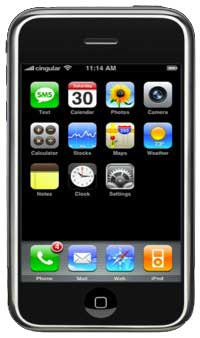
I cracked. Didn’t even last a week. I tried to resist, but every day I went to the apple store to play with an iPhone. The 8GB models were continuously out of stock. Usually the 4G models were too. It compelled me. Like the iMac did nearly 2 years ago, and like another mac most likely will at macworld 2008.
iPhone 1.0
I checked the apple store iphone availability link every morning. Finally, on saturday, the dot was green. it was still only 8am and apple store opened at 9. We got there around 8:30 and there was already a line outside. I got on line while k parked the car.

About 5 minutes after we got there, an apple store employee walked down the line handing iphone shaped tickets to everyone. The ticket was a guarantee of 8GB iphone availability if purchased by 10am. We didn’t even have to stay on line, but stayed anyway. Less than half an hour later, me and K walked out of the store with a pretty iphone bag containing a beautiful well designed iphone box. I was kind of in shock.

We went across the street to the cingular store to add the iphone data plan ($20/month for unlimited data and visual voicemail). They let me log in to my itunes account from there and activate the phone so they could make sure the att account end of things went correctly. It did. Before we left the store, my iphone was working and my motorola was dead.

When I opened the box, there was a beautiful shiny iphone packaged in a very neat and elegant way like most apple products are. On the way home, I took photos, called my folks, and surfed the web. Don’t worry, Karen was driving ;)

The screen is beautiful. The video quality is amazing. The sound is clear. The screen gets lots of fingerprints on it, but you can’t notice them unless the phone is off or sleeping. A small cloth was included to wipe it. The cloth did an okay job, but the one that came with my case was much better and wiped off every smudge.

I could open a Word doc in email with no problem. The wifi speed is relatively fast. The edge network connection is more like dialup, but definitely usable. It is amazing to be able to look stuff up from anywhere that a cell phone signal can be had. This is something I think will come in very handy. I can look up directions from google maps when I get lost. I get lost a lot.

The touchscreen is fun, especially the pinchy thing where you can zoom in or out. I started out slow on the keyboard, but can type much faster now. Still using one finger, but I have read that typing with 2 thumbs can be much faster. There is a good video on the apple site about the keyboard.

One very cool thing that the video mentions is that the iphone will dynamically resize the letter tap zones for the most likely letter, and make the adjacent letter’s tap zones smaller.

Something that is essential to know is that you can zoom in on the text and cursor on the screen by holding your finger down in the area you want to magnify and moving the cursor. This makes it MUCH easier to move the cursor to where you want it to be.

Word prediction is much better than it seems at first. The trick is not to doubt it and refrain from backspacing to fix your own errors. Sometimes that is necessary, but most often, the keyboard will guess what the misspelled word was supposed to be, even though the guesses it makes while you are typing are not even close.

Word auto-complete sucks. While the late guessing of correct words works okay for typos and spelling errors, it is terrible for completing words. Sometimes it doesn’t guess the word until the last letter, making it useless, or even worse, guesses the wrong word on the last letter. In that case, you have to cancel the suggested word or it will replace your correct word. Easy to miss this if you are looking at the keyboard instead of the message. To auto-complete a guessed word, tap the spacebar on the keyboard. To get rid of it, tap the word on the screen.

I am loving the Notes app. For the non-mac people, an app is the same thing as a program. Usually, I have about 10 random scraps of paper in my back pocket, and another 100 or so on my desk, all containing information that I want to remember, but will most likely never see again. The iphone offers a very easy way to keep notes in one place.

This past week, I have been taking notes about things I have been noticing and learning about the iphone. For the most part, I think this is the coolest phone I have ever had or ever seen. I am very lucky and happy to have it. Even still, there is definitely room for improvement.

I knew going in that this is a version 1.0 product, so was expecting things to be missing or broken. I don’t think anything is broken. Some of the things that are missing surprise me very much and I am guessing (and hoping) that at least some of them will be added in a software update.

Some things that are glaringly missing:

  • Text select – This is so basic. It is hard to believe it is not possible. I have checked, and it really is not.
  • Cut/Copy/Paste – See text select.
  • MMS (multimedia messaging – text messages with pictures) – Basic mobile phone feature.
  • Notes do not sync with anything on the computer. Very strange. I should note — haha, note. that’s funny :) — that you can email a note easily, so it is not that hard to get it on your computer, but syncing seems pretty basic.
  • You can not add attachments to email. I think it would be better to include the ability to email pictures, notes, and other attachments directly from the mail app, while still keeping the option to email them from the pix and notes apps.
  • No Select All option for email messages (or anything else). There is no way to delete a bunch of mail at a time. Why?

Not glaring, but still missing:

  • Voice memo – probably glaring to anyone who was used to using it on their old phone. It is kind of weird since there is an included recorder for setting voicemail greeting.
  • There is no video recorder.
  • No included games.

Other random gripes:

  • Some things take too many clicks. Navigating through different email accounts really needs to be streamlined. It would also be nice to have a period and comma key available on the same keyboard as the letters for text apps.

    Keyboards for some apps are specialized and smart. For example, the safari keyboard includes period, slash, and ‘.com’ keys.

  • No way to choose which widgets appear on the main screen.
  • Safari does not remember the zoomed screen size so I have to rezoom on every page.
  • The screen does not always rotate from portrait to landscape view on the first try.

3rd party apps!

The way Apple has set up the iPhone to work with 3rd party apps is to run them in safari. To use an app, just go to the app’s url. If you like it, you can bookmark it for easy access.

There are also a few launcher type apps that act as a main bookmark page that is only for your third party apps and prettier to look at than regular bookmarks.

There is a big list of iphone apps here: iPhone Application List and another here: appleopolis.com. You can skip the login on the second one. No login for first one.

I am currently trying out mojits.com, which is a launcher type thing for iphone apps that you access through safari. Hard to tell if I like it because I only tried using it for 5 minutes.

I was pretty impressed with a shopping list app called OneTrip. OneTrip makes it easy to make a shopping list by offering prewritten selections that are organized by category. There is an option to add your own things to each category.

I also added a bejeweled type game, a movie time finder, and an app called iActu that brings the content of 6 popular newspapers in a cool looking newsstand style. When you click on a paper, the newsstand goes away and the news is displayed in an easy to read way.

WordPress iPhone Theme and Plugin by Content.Robot – automatically reformats your site’s content for optimized viewing on an iPhone. Thank you content.robot! I am using it on LBnuke, with the only modification being changing the blue to red to match the site.

Other interesting tips and factoids gathered from around the web:

From iPhone Central at Macworld.com:

“When browsing a web page in Safari on an iPhone, one tap of the top status bar (signal strength, time, etc.) brings you back to the top of the page, complete with the URL field visible.”
–Dan Moren

Airplane Mode … disables all wireless functionality (phone, EDGE, Wi-Fi, Bluetooth) but lets you use the iPhone’s non-Internet applications.
–Dan Frakes

If your iPhone freezes…
Reset: Apple’s first reset tip, which is pressing and holding the Home button for about six seconds. This quits any application that may have locked up the iPhone.
Reboot: Press and hold the Home and On/Off for about 10 seconds until the Apple logo appears.
–Christopher Breen (edited by LB for length)

In Safari on the iPhone, holding your finger down on a link pops up a balloon displaying the underlying URL. Also works on HTML messages in Mail. Holding your finger on a link shows you where the URL is really going to take you.
–Dan Frakes

There is a great tip from David Pogue on the The Missing Manual website about how to type punctuation without having to switch back and forth between the letters and the number/symbols keyboard. Basically, you hold down the “.?123″ key when you are switching to the numbers keyboard and rather than letting it go, you slide your finger to the punctuation that you want to type and then release it. After release, the letters keyboard returns. Click here to read the full keyboard punctuation tip at the Missing Manual site.

That is all I have for now. Maybe I will write again if I notice more things, find some cool apps, or if Apple releases software updates that adds new features.

  1. Minesweeper Madness The best version of Minesweeper I have played so far...
  2. Random Geekery First, an iphone update. It still rocks! Most of the...
  3. Macworld 2008 Today was the last day of Macworld. It makes me...

Pod People

iPod nanoI am now one of them. I have resisted getting an ipod for years, mostly because I find it kind of crazy that there is no way to input data without transferring files from a computer.

I have been tempted repeatedly, mostly by the shiny black video ipods and nanos. The screen size of the video ipods seem a little small for watching videos. Better to wait for the iPhone. :) The nanos are harder to resist. I don’t need one. I have a palm pilot that does everything a nano can do and more. Still, I see them in the store and want one every time. Marketing genius.

It is likely that I will eventually get an iPhone. I will try to wait for version 2.0 when the initial bugs and annoyances have been worked out. The iPhone screen is a better size for video, not to mention the million other things it does. But it is crazy expensive, not even including whatever monthly fee there will be to use all of its features.
[Read more...]

  1. Review: iPhone 1.0 I cracked. Didn’t even last a week. I tried to...
  2. First Annual Distraction Awards I have been very distracted lately! Too many things going...
  3. All Drupal All The Time – Too Bad I Can’t Breathe Writing on the iPhone. Hard to breathe. Shaky. Strangely okay...

Macworld 2007 | Last Day

I am back in the microsoft blogger lounge for the last time. I got to the show a couple of hours ago and have been wandering the expo floor to see all of the things that I hadn’t seen yet and the things that I wanted to see again. Curiosity drove me to purchase a $10 copy of OmniWeb. I have been curious for so long why people would pay for a browser when there is Firefox for free. And Safari. And Opera. Etc. The convincing feature was the ease of specifying per site settings, including custom stylesheets. There are some other nice features too.

I am glad I got back here today. Yesterday didn’t turn out so well. I never made it to the final session of the user’s conference. I wasn’t feeling well and ended up walking around outside for a long time until I felt well enough to get on BART. I couldn’t drive or take the bus when I got back to Oakland. Everything was wrong. I felt very strange in my brain and body. Sick and still in that freakin’ cotton ball. I walked home and fell asleep almost instantly and didn’t wake up until night time. Today is not so great either, but way better than yesterday.

I will look around some more, but I think I have finally had my fix. Still, it is hard to leave so much geekiness behind. There is a lot of cool stuff here but I am very tired and I don’t want to get stuck here like I did yesterday.

  1. Macworld 2007 :: Day 3 | Insomniac A funny thing happened to me on the way to...
  2. Macworld 2007 :: Day 1 | It Begins I am at Moscone Center. Just got my badge for...
  3. The Keynote | Macworld 2007 note: raw notes scribbled during the keynote. these will be...

Day 4 | Microsoft Blogger Lounge

I can’t resist. i am in the ‘microsoft blogger lounge’, blogging. Here is something that microsoft has truly done right. A small oasis smack in the middle of macworld chaos. Round tables with back to back 17″ imacs. Groupings of comfortable soft black chairs and couches arranged around matching oversized ottoman tables. Powerstrips. Ethernet cables. Free drinks. I love it here. The noise fades into the background. Not fades exactly. More like becomes a blanket of white noise.
[Read more...]

  1. Macworld 2006 :: Day 5 | The End Macworld is over. I am sad even though I really...
  2. Macworld 2007 | Last Day I am back in the microsoft blogger lounge for the...
  3. if $brain >= $fried ? ramble : $code; I am too busy. I suck at being busy. It...

Macworld 2007 :: Day 3 | Insomniac

A funny thing happened to me on the way to macworld today… actually, it wasn’t very funny, but it turned out okay. I couldn’t get any parking at BART and ended up driving to the city. Got to Moscone Center with 1 minute to spare before the first conference session started; Mac OS X Hints. I parked in a garage on 3rd st. and was in such a rush, i didn’t even see what the prices were. I hope they take credit cards! The session was too full and i couldn’t get in. I tried a couple of others, but wasn’t really into it. Luckily, tons of other people didn’t get in either, so they are repeating it before the next round starts. I am in the hallway waiting for that now.
[Read more...]

  1. The Keynote | Macworld 2007 note: raw notes scribbled during the keynote. these will be...
  2. Macworld 2007 :: Day 1 | It Begins I am at Moscone Center. Just got my badge for...
  3. Macworld 2006 :: Day 3 | The Morning This morning I woke up at 5am because I was...

The Keynote | Macworld 2007

iPhonenote: raw notes scribbled during the keynote. these will be edited and reposted at some point in the near future.

update: changed my mind. too tired to edit. i will just add the photo and the ‘read more’ link, fix the typos, and leave the ramble as is. To skip the ramble and view the actual keynote, click here.

[Read more...]

  1. Macworld 2006 :: Day 2 | Keynote No doubt that Steve Jobs is an excellent speaker who...
  2. Macworld 2005 I am at MacWorld, day 4. So far it has...
  3. Pod People I am now one of them. I have resisted getting...

Macworld 2007 :: Day 1 | It Begins

I am at Moscone Center. Just got my badge for macworld. No lines today. Exept for food! There are endless lines at the 2 food stands. The power tools conferences must have just broken for lunch when I got here and the food stands were just opening. It is a good time not to be hungry. Nothing going on here today besides from registration and the first round of power tools conferences. Even though I am not signed up for any of those, I thought i would take advantage of the free wireless while I am here.
[Read more...]

  1. The Keynote | Macworld 2007 note: raw notes scribbled during the keynote. these will be...
  2. Macworld 2007 | Last Day I am back in the microsoft blogger lounge for the...
  3. Macworld 2007 :: Day 3 | Insomniac A funny thing happened to me on the way to...

Work, Weariness, and Warcrack

Work has been very busy lately. I have one very big job, and possibly several other smaller jobs coming up. I am hoping to be able to partner with d. We will try a test run with one of the smaller jobs. We have almost completely opposite skills and completely opposite ways of working. I think that is a good thing. She is very organized about the initial process of signing up a client, including managing expectations, writing contracts, and charging realistic prices based on actual time worked, rather than pulling some random number out of the air like I tend to do. She is also skilled at graphic design and has experience making web sites. If I had my way, I would stick to the (x)html/css and back end coding for the site and do technical support for the client after the site is complete. I would leave the business stuff, front end design, and client management to someone else. Could be a match made in heaven if we can somehow merge our oppositeness into a working business.

It is getting harder to keep up with school. The ‘side-effect’ of feeling better lately is that I have lost the super-focus that I was having when I was undermedicated. I have also been very twitchy and shaky which is quite annoying. It is a strange balance. It is still hard for me to get out, but not as hard as before. The main difference is that I am not completely exhausted like before. I can do a wider range of things, but am back to having a one second attention span. Going to see the doc on wednesday, but not sure if I am ready to continue experimenting with new meds and/or doses and timing of meds.

I am tired of waiting and waiting to find the right combination of drugs and going through long periods of terrible side-effects until the next drug or dose kicks in. I will probably keep experimenting, but am thinking of taking a break for a while and going back to figuring out ways to make myself feel better even when things aren’t so good. It has been very hard to do that while continuously messing with my meds, and I am hoping that taking a break will help, at least in the way of keeping things stable for a while. One of my best skills is adapting to life under less than ideal circumstances. It is impossible to adapt to something that keeps changing.
[Read more...]

  1. If Architects Had To Work Like Web Designers From: Software is too expensive to build cheaply Dear Mr....
  2. Dedicated $erver My new meds are still working much better than the...
  3. if $brain >= $fried ? ramble : $code; I am too busy. I suck at being busy. It...

Mac Freeware

Some of my favorite mac freeware *

  • Adium – multi-protocol instant messaging client
  • Butler – application launcher with many other handy features
  • Camino – mac-like gecko browser. not as many features as firefox, but faster.
  • ClamAV – Antivirus program, because you just never know…
  • ColloquyGUI IRC client
  • ColorTagGen – Use the eyedropper to get fast hex color codes. This little app rocks!
  • Dashboard KickStart – brings up the dashboard for a second at startup so that you don’t have to wait for it to load the first time you use it.
  • Firefox – I heart Firefox
  • MAMP – Mac, Apache, MySQL, PHP server environment in an easy to install, easy to use package. Includes Apache v2.0.x, phpMyAdmin, MySQL v5.0.x, PHP v4.4.x and v5.1.x, and more.
  • NeoOffice – Mac version of OpenOffice (OO also works on a mac). No need for X11 with Neo. Prettier than OO.
  • Onyx – tweaking, maintenance, etc.
  • Quicksilver – similar to Butler, only geekier. I use it on my powerbook. I find Butler’s interface a little more intuitive.
  • Smell-O-Mints – Periodic table with some nice features
  • TextWrangler – I actually use BBedit, but TextWrangler is an excellent free text editor that does much of what BBedit does so I have to mention it here.
  • Transmission – BitTorrent Client

Widgets:

  • Image Shackle – fast easy way to resize images. Just drag the image to the widget, set a size, and click ‘shackle’ for a copy of your image at the specified size. I love this widget!
  • Panda Cam – live feed from the San Diego Zoo’s Panda Cam
  • PHP function reference (PHPfr) – comprehensive PHP reference
  • iStat Pro – system monitoring widget

There is a great list which includes many of the programs mentioned above (and many that aren’t) at xfreeware.com.

Anyone else have any favorite mac freeware? Please share…

*I am using the word freeware because payment is not required to use these apps with all features enabled and without a time limit. Many of the programmers accept donations to compensate them for their time and effort. If you can afford it and use the program regularly, please consider donating :)

  1. Mozilla Firefox 1.0 Released! Finally, the long awaited release of Mozilla Firefox 1.0 is...
  2. WordPress 2.2 Upgrade I am starting to believe that the days of the...
  3. Widget of the Day :: Panda Cam I have a new favorite widget. Panda Cam is a...

Review: iWeb 1.0

I have read the mixed reviews. I have looked at the insanely redundant (yet CSS based) code. I have pointed and clicked my way to a pretty cool website! It is definitely worth the $79 price tag, especially considering that the price includes the entire iLife ’06 suite! (iLife also includes iPhoto, iMovie, iDVD, and Garage Band)

This is not a professional web design/development application, and anyone who is looking for that will not be happy with it. Design options are limited in many ways. Programming options are limited to what is built in. Generated source code is mostly lots of divs with tons of repetitive inline styling and NO semantic markup. If you need a pro wysiwyg web app, Dreamweaver 8 is the way to go.
[Read more...]

  1. imac core duo It got here yesterday. 20″ imac 2.0GHz intel core duo....
  2. Day 4 | Microsoft Blogger Lounge I can’t resist. i am in the ‘microsoft blogger lounge’,...
  3. Review: iPhone 1.0 I cracked. Didn’t even last a week. I tried to...