Change Admin Post/Page List Color By Status

Favorite WordPress tip of the week:

This snippet will change the background colors of posts, pages, and custom post types in the administration post/page lists based on their status, i.e. draft, private, pending, etc.

<?php
add_action('admin_footer','posts_status_color');
function posts_status_color(){
?>
<style>
.status-draft { background: #ffffe0 !important ; }
.status-future { background: #cf9 !important; }
.status-publish { /* no background - keep alternating rows */ }
.status-pending { background: #87c5d6 !important; }
.status-private { background:#fc9; }
</style>
<?php
}

Note: Draft color changed to a slightly lighter yellow than original.

Don’t get_the_permalink()

get_the_permalink() does not exist. Use get_permalink.

Note to self: Debug my own site like I would debug any other site.

I have used that function an uncountable amount of times, but got confused anyway because of having get_the_title() on my brain.

This tip was brought to you by the half hour of my life that I will never get back.

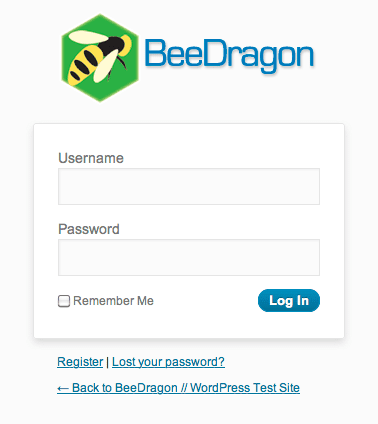
Customize the WordPress Login Page

Custom Login Page

Custom Login Page

I love WordPress and am personally very happy to see the WordPress logo when I log into a site, but when building sites for some clients (and on my own development site where I build sites for clients to preview), it is nice to use their own logo for the login page. It gives a more professional look and fits in with the rest of their branding.

This snippet will use a custom logo instead of the WordPress default logo.

1. Upload your logo to the server, either manually or through the WordPress media library. It is best if the logo image is 326×82 px or smaller.

2. In your theme’s functions.php file, add this code:

// login page logo
function custom_login_logo() {
    echo '<style type="text/css">h1 a { background: url('.get_bloginfo('url').'/PATH_TO_IMAGE/YOUR_IMAGE.png) 50% 50% no-repeat !important; }</style>';
}
add_action('login_head', 'custom_login_logo');

Replace PATH_TO_IMAGE/YOUR_IMAGE.png with the path to your logo image, i.e. images/logo.png.

To customize the entire login page (including the logo), you can use a similar function to call a custom stylesheet for the login page:

// custom login page
function custom_login_page() {
	echo '<link rel="stylesheet" type="text/css" href="' . get_bloginfo('stylesheet_directory') . '/customlogin.css" />';
}

add_action('login_head', 'custom_login_page');

Display Custom Fields In & Out of The Loop

INSIDE THE LOOP:

<?php

if ( get_post_meta($post->ID, 'custom-field-name', true) ) :
	echo get_post_meta($post->ID, 'custom-field-name', true);
	endif;

?>

OUTSIDE THE LOOP:

<?php

	global $wp_query;
	$postid = $wp_query->post->ID;
	echo get_post_meta($postid, 'custom-field-name', true);
	wp_reset_query();

?>

Numbered Search Results in WordPress

I needed to show search results in an ordered list for a project I am working on and was very surprised to discover how involved this is for paginated search results. Showing the results using a regular ordered list starts the list numbering over at 1 on each new page of results, even though the next set of results was being displayed.

After some horribly hacky solution involving grabbing the page number from the URL and hard coding the number of posts per page, I was led in the right direction by NicktheGeek at StudioPress who suggested getting the number of posts per page from the query string and using the paged value to get the numbers dynamically before applying the math to get the list numbers to display correctly.

A bunch of CSS was required to make the list numbers look like they were actually generated by an <ol> tag. Styling will vary depending on your theme, but one thing that may help if things are looking messed up is to display the post/page titles and contents inline.

CSS:

.search-results #content h2.entry-title,
.search-results #content .post,
.search-results #content .page {
	display: inline;
}

PHP:
For non-Genesis themes, leave out the genesis_ lines.

global $paged;
if(empty($paged)) $paged = 1;

$loop_counter = 1;

$results_per_page = get_query_var('posts_per_page');

echo '<ol class="search-list">';

genesis_before_post();

if ( have_posts() ) : while ( have_posts() ) : the_post();

	if( $paged == 1 ) {
		$real_count = $loop_counter;
	} else {
		$real_count = $loop_counter + ( $paged * $results_per_page - $results_per_page);
	}

	echo '<li><span class="listnum">' . $real_count . '.</span>';

	// The Post

	echo '</li>';

	genesis_after_post();

	$loop_counter++;

	endwhile;
	genesis_after_endwhile();

else :
	genesis_loop_else();
endif;

echo '</ol>';

Function: wp_tag_cloud

Usage:

<?php wp_tag_cloud( $args ); ?>

Defaults:

 <?php $args = array(
    'smallest'                  => 8,
    'largest'                   => 22,
    'unit'                      => 'pt',
    'number'                    => 45,
    'format'                    => 'flat',
    'separator'                 => \"\n\",
    'orderby'                   => 'name',
    'order'                     => 'ASC',
    'exclude'                   => null,
    'include'                   => null,
    'topic_count_text_callback' => default_topic_count_text,
    'link'                      => 'view',
    'taxonomy'                  => 'post_tag',
    'echo'                      => true ); ?>

Parameters:

smallest
(integer) (optional) The text size of the tag with the smallest count value (units given by unit parameter).

Default: 8

largest
(integer) (optional) The text size of the tag with the highest count value (units given by the unit parameter).

Default: 22

unit
(string) (optional) Unit of measure as pertains to the smallest and largest values. This can be any CSS length value, e.g. pt, px, em, %.

Default: ‘pt’

number
(integer) (optional) The number of actual tags to display in the cloud. (Use ’0′ to display all tags.)

Default: 45

format
(string) (optional) Format of the cloud display.

  • ‘flat’ separated by whitespace defined by ‘separator’ parameter.
  • ‘list’ UL with a class of ‘wp-tag-cloud’
  • ‘array’ returns the tag cloud as an array for use in PHP

Default: flat

separator
(string) (optional) The text/space between tags.

Default: ‘\n’ (whitespace)

orderby
(string) (optional) Order of the tags.

  • ‘name’
  • ‘count’

Default: name

order
(string) (optional) Sort order.

  • ‘ASC’
  • ‘DESC’
  • ‘RAND’ tags are in a random order.

Default: ASC

exclude
(string) (null) optional

Default: None

include
(string) (null) optional

Default: None

topic_count_text_callback
(string) (optional) The function, which, given the count of the posts with that tag, returns a text for the tooltip of the tag link.

Default: default_topic_count_text

link
(string) (optional) Set link to allow edit of a particular tag.

  • ‘view’
  • ‘edit’

Default: view

taxonomy
(string or array) (optional) Taxonomy or array of taxonomies to use in generating the cloud.

  • ‘post_tag’
  • ‘category’
  • ‘link_category’
  • ‘any other registered taxonomy’
  • or array of taxonomies Note: this parameter was introduced with Version 3.1

Default: post_tag

echo
(boolean) (optional) Display the result or return it in a variable. The default is true (display the tag cloud).

  • 1 (true)
  • 0 (false)

Default: true

Genesis: Remove/Change post info/post meta

// Remove post meta
remove_action('genesis_after_post_content', 'genesis_post_meta');

// Customize the post meta function
add_filter('genesis_post_meta', 'post_meta_filter');
function post_meta_filter($post_meta) {
if (!is_page()) {
    $post_meta = 'Filed Under:   Tagged With: ,  ';
    return $post_meta;
}}

// Remove the post info function
remove_action('genesis_before_post_content', 'genesis_post_info');

// Customize the post info function
add_filter('genesis_post_info', 'post_info_filter');
function post_info_filter($post_info) {
if (!is_page()) {
    // Spaces are added to [ shortcodes ] so that they will display in this post.
    $post_info = '[ post_date ] by [ post_author_posts_link ] at [ post_time ] [ post_comments ] [ post_edit ]';
    return $post_info;
}}

Please note that you do not need to remove a function before editing it. Hat tip to jim :)

Genesis: Custom loop arguments

remove_action('genesis_loop', 'genesis_do_loop');
add_action('genesis_loop', 'custom_do_cat_loop');

function custom_do_cat_loop() {
    global $query_args;  // any wp_query() args
    $args= array('orderby' => 'title', 'order' => 'ASC');
    genesis_custom_loop(wp_parse_args($query_args, $args));
}

Genesis: Custom Page Template

<?php // Template Name: Template Name Here

remove_action('genesis_loop', 'genesis_do_loop');
add_action('genesis_loop', 'custom_loop');

function custom_loop() {
    global $paged;
    $args = array('post_type' => 'PostType'); // any wp_query args can go here
    genesis_custom_loop( $args );

}

genesis();

Genesis: Default Post Thumbnail

// Default post thumbnail
add_filter('genesis_get_image', 'default_image_fallback', 10, 2);
	function default_image_fallback($output, $args) {
			global $post;
			if( $output || $args['size'] == 'full' )
					return $output;

			$thumbnail = CHILD_URL.'/images/thumb.jpg';

			switch($args['format']) {

					case 'html' :
							return '<img src="'.$thumbnail.'" class="alignleft post-image" alt="'. get_the_title($post->ID) .'" />';
							break;
					case 'url' :
							return $thumbnail;
							break;
				 default :
						 return $output;
							break;
			}
	}