Mac Stuff

RIP Steve Jobs, Derrick Bell, and Rev. Fred Shuttlesworth

Derrick Bell, Steve Jobs, and Rev. Fred Shuttlesworth

Derrick Bell, Steve Jobs, and Rev. Fred Shuttlesworth.
(Photo: David Shankbone/Wikicommons, Justin Sullivan/Getty Images, REUTERS/Tami Chappell)

I am sad that Steve Jobs is gone. I didn’t know him, but like many other people, he changed my life. There have been many tributes to Mr. Jobs in the past week and it is easy to see how widespread his influence was. There is also some negative sentiment in which people are furious that so much attention and honor is given to the death of a corporate billionaire while the deaths of race scholar Derrick Bell and civil rights leader Rev. Fred Shuttlesworth, who died on the same day, were much less prominently noted. I definitely agree that the deaths of Derrick Bell and Rev. Shuttlesworth deserve at least as much attention as the death of Steve Jobs, but it is Steve Jobs’ influence on my life that I will write about here.

Apple IIe

Apple IIe

Like many computer geeks, Steve Jobs was a hero and an inspiration to me. He changed ‘thinking different’ from a reason to get beat up to a reason to be respected (at least as far as nerdy computer geeks go). I have been in continuous awe of the things he has created since the day my dad brought home an Apple IIe in 1983. That, along with a Commodore 64 and a VIC-20 that we used in the high school Computer Club, were the first places I learned about programming. BASIC. Loved it!

To a person who thinks of things in a very literal way and finds it hard to get along in a world where logic does not always dictate reality, programming provides a comfort, a world where actions and consequences are dictated by logic alone.

Aside from learning some PASCAL in college, I was out of the computer/media loop until 1995, when my dad told me about Windows 95. I got my first PC, a Compaq Presario 100MHz mini-tower with 8KB RAM, and read “Windows 95 For Dummies” from cover to cover. Over the next 10 years, I learned to build and fix PCs. I learned to build websites using FrontPage Express, a program that was included with Internet Explorer 4. It had a split view where you could look at the visual web site on one side and the code on the other, making it very easy to see how changing one would affect the other. I also learned more than I ever wanted to know about the Windows operating system.

By 2004, I was sick of the constant problems with Windows and had decided to switch to Linux. 2004 was also the year that the San Francisco Apple Store first opened. Lured by the promise of shiny electronic things, I wandered into the store and was completely blown away by what I saw. The operating system of the time was OS X 10.3, aka Panther. It was simple and beautiful, yet had the power, stability, and security of a UNIX based operating system behind it. That was it. The bar was raised forever. My first mac was a 12″ PowerBook 1.33GHZ PowerPC with 256MB of RAM. Somehow, that little thing ran circles around my 3GHz Pentium 4 PC with 1GB RAM.

I knew almost nothing about my new mac, which was a little disturbing considering that I could troubleshoot Windows in my sleep. Luckily, Karen knew how to use a mac and showed me the way. Before long, I realized that I was so confused at first because everything was so easy to do! I expected everything to be more complicated and unstable like Windows, but it was not. There was no need to troubleshoot in my sleep anymore. Like programming, macs made sense to me.

I currently use a 24″ iMac, a 15″ MacBook Pro, and an iPhone to do my work, learn new things, play games, and communicate with the world in a way that was not possible for me in the past. I am thankful to Steve Jobs for thinking differently and for the amazing contributions that he has made to the technical world. I am thankful to him for his inspiration and vision. I will miss him and the contributions he surely would have made in the future had his life not been cut so short.

Steve Wozniak remembers Steve Jobs

  1. Macworld 2006 :: Day 2 | Keynote No doubt that Steve Jobs is an excellent speaker who...
  2. Macworld 2006 :: Day 3 | The Morning This morning I woke up at 5am because I was...
  3. Powerbook Got a 12″ PowerBook G4 today. I feel like a...

Minesweeper Madness

The best version of Minesweeper I have played so far on the mac.

Favorite minesweeper app for iPhone :

Both of these apps are free.

21 Favorite Mac Apps of the Moment

Update (8/3/09): Added SuperDuper! to list and changed title.

World of Goo

World of Goo

Just got my aluminum imac replaced by Apple. The old one was kind of possessed by gremlins or some such thing. After several failed repair attempts, part replacements, and countless hours of phone support, Apple agreed to give me a shiny new computer. Loving it :) The specs are not all that much different from the first one, but the parts are better, so it is faster and the graphics are extra kick ass.

While restoring my data, I was having an appreciation of all the great mac software out there. Much of it is free, donationware, or relatively low cost. Here are some of my current favorites (in no particular order):

  1. Caffeine (Free) – A one trick wonder. Puts a coffee cup icon in the menu bar that, when clicked, prevents your computer from automatically going to sleep, dimming, or starting screen savers. It is really great for reading long articles and watching videos or screencasts. You can set a default duration for it to stay on so that you don’t have to worry about forgetting to disable it.
  2. SuperDuper! ($27.95) – I can’t believe I left this one out! SuperDuper! is a backup program that will make a fully bootable backup, or “clone” of your mac’s hard drive. I clone mine nightly. During my aforementioned computer woes, I recovered my drive several times using SuperDuper! and booted my laptop from the clone while my imac was in the shop so that I could keep working.
  3. DropBox (Free to $199/yr.)- Online storage and file sync for mac, windows, and linux. First 2 GB of space is free and you can get up to 3 GB more by referring other people. If you click the link in this article, we will both get 250G extra space :) Paid accounts are available with 50 or 100 GB storage. One feature I love is that you can create public downloads by right-clicking on a file in your Public folder and selecting ‘Copy public link’. This allows anyone who has the link to download the file.
  4. Komodo Edit (Free) & Komodo IDE ($99-$245) – Both of these code editors are great. Komodo edit has an excellent set of features for a free app. Multiple languages, code formatting, auto-indent and more. Komodo IDE adds debugging, a code browser, source-control systems integration, and other handy tools like a regular expressions toolkit.
  5. MAMP (Free) – MAMP rocks! It is a really quick way to set up a local development environment. Installs and configures Apache, PHP, MySQL, and phpMyAdmin in a self-contained directory that will not interfere with any existing Apache installations.
  6. Transmit ($29.95) – There are some great free FTP clients out there, but I really love the Transmit interface, mac integration, and the fact that it can handle any FTP task I throw at it (SFTP, TLS/SSL, WebDav, iDisk, Amazon S3, server to server transfers and lots more. If you have mobileMe, you can sync your accounts between macs.
  7. Bookdog ($19.95) – Syncs bookmarks between browsers. Amazing. Removes duplicates, sorts, and verifies links. Syncs with del.icio.us and Google Bookmarks and works with tons of browsers.
  8. ImageWell (~$18) – I have had this tiny app for years and use it all the time. Great for quickly resizing images and adding watermarks. Photoshop and other apps will do the same thing, but none will do it as fast or as easy.
  9. ColorTagGen (Free) – Another app I use all the time. Lets you use the mac color picker to generate hexidecimal and RGB values of colors. A closely related app which I also use is Hex Color Picker (Donationware) which adds a tab to the system-wide color panel that allows you to see and edit the hex color code for any color.
  10. Bento – ($49) – Bento (made by FileMaker) is drag and drop easy to use database software. I can never decide if I like it or hate it, but find myself using it more and more. It is great for simple databases like a client list or home inventory, but I often wish it had more relational database features like FileMaker. Bento is also slow to open and I use it for information that I need to access quickly. On the other hand, it does more than a spreadsheet and makes data pretty.
  11. Together ($39) – Junk drawer software. A place to put all that random information that you want to be able to reference in the future. I tried a bunch of apps when it was time to replace my beloved Yojimbo, which was starting to feel out of date and cumbersome. Together came out on top for having the features I needed without being too complicated or too basic.
  12. Text Edit – Basic mac text editing program. I default to plain text format and use this all the time to clean text that was sent to me by clients in Word or copied from a web page. I also use it for a notepad and scratch pad.
  13. LaunchBar (~$34) – Quickly launch applications, access clipboard history, find documents, and much more with your keyboard. Very similar to QuickSilver, which I used to love, but started having problems with, possibly because it is in perpetual beta. Still, it is a classic and it is free.
  14. MenuCalendarClock (Free, $19.95 for advanced features) – I love this tiny app. Lets you customize the menu bar display of time and date (best to disable default time display in System Preferences). Clicking on the menu bar date/time drops down a calendar that highlights days with scheduled events. Hover over the dates and a tooltip appears showing the events for that day. Lots of other cool features. Not really sure which ones are in free vs. paid version, but there is a comparison at the site.
  15. DragThing (Shareware, $29) – Dock replacement. Allows you to create multiple docks, each with multiple tabs, and place them anywhere you want. Along with LaunchBar, this is one of the first things I install on any mac. I wrote a post about DragThing last year.
  16. Default Folder X ($34.95) - Adds many useful features to Open and Save dialog boxes. Choose recent and favorite folders quickly. Assign default folders for applications. Menu bar icon for fast access to favorite and recent folders, open finder windows, and all other folders through flyout menus.
  17. PathFinder ($39.95) - Finder replacement (works alongside of Finder). Adds about a million features that you wish were in the Finder. More sorting and display options, dual pane browser for side by side folders in one window, tabs, drop stack to hold files in a temporary stack, and more.
  18. 1Password ($39.95) – Store logins, passwords, credit card info, and secure notes. Integrates with most browsers allowing you to log into websites and enter credit card information with just a few keystrokes. You only need to remember one master password to allow the browsers access to the stored information. Pretty amazing if you have tons of logins to remember and/or shop online.
  19. TextExpander ($29.95), Typinator ($19.99) , TypeIt4Me ($27)   – Thanks to the many mac software bundles, I have somehow managed to have a license to all 3 of these apps. Currently I am using TextExpander, but I don’t think I have a preference. They all have their pros and cons. Mostly pros. All 3 apps basically do the same thing – inserting text and/or images when you type a short abbreviation. For example, when I type bsig, it automatically changes to my 4 line business email signature. Also great for canned responses, code snippets, email addresses, phone numbers, common typos, URLs, and anything else that you type regularly.
  20. Paparazzi (Donationware) – Another one trick wonder. Takes full page screenshots of web pages. Very handy for designers and developers that need to view an entire web page at one time.
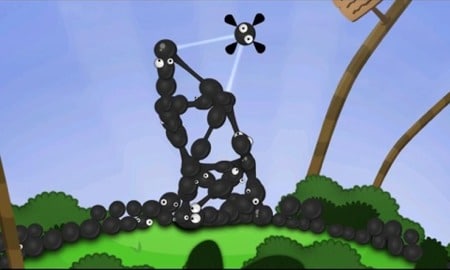
  21. World of Goo ($20) – Not sure what to say about World of Goo except that you should try the demo (mac, windows, linux). Completely original game involving balls of goo with different physical properties. The “dialog” and sounds are funny, the graphics and animation are excellent, and it’s very fun! Warning: May also cause extreme frustration in certain circumstances.

That is all I can think of for now. Curious what other people’s favorite apps are. I’ll try just about anything that has a demo version.

  1. Minesweeper Madness The best version of Minesweeper I have played so far...
  2. Smell-o-mints Smell-o-mints is a very fun, free mac program. It is...
  3. Video: The Dragonborn Comes Beautiful rendition of ‘The Dragonborn Comes’ (Skyrim Bard Song and...

Chalkboard Color Scheme for Komodo

This color scheme is updated regularly. (View Updates)

Komodo PHP Sample

Komodo PHP Sample

Komodo Edit 5 has been my default code editor for the past week or so. It is much faster and nicer to look at than previous versions that I have tried. I switch default code editors almost as often as I switch default browsers. There are so many good ones out there, but none feels exactly right. Considering I spend most of my days switching between browsers and editor, I like to keep up with the latest that is available for mac.

One of the things I am most picky about in an editor is the color scheme. It is very hard for me to find schemes that I can stand to stare at for long periods of time. Schemes with white/light backgrounds and colored text are usually too bright for me and dark schemes are usually either too high or too low contrast. For this reason, I usually end up making my own.

If anyone else is using Komodo Edit (or Komodo IDE) and is similarly picky about color schemes, I have made it available for download.

Click here to download the LB Chalkboard scheme

Komodo CSS sample

Komodo CSS Sample

I should mention that the only language specific colors I made changes to are PHP, CSS, HTML, XML, and JavaScript. Also, I am still changing things as I come across them.

Update (3/4/09): Changed CSS comment color from green to default grey.

Update (3/21/09): Downloaded the trial version of Komodo IDE 5 yesterday and noticed that schemes switched over automatically. [update: bought Komodo IDE 5 after trial expired. Still loving it (1/17/10)]

Update (3/24/09): Fixed issue with some defaults changing from white to black text after update to Komodo 5.1. Added language specific colors for Smarty.

Update (8/23/09): Changed Common Syntax bracehighlight background color from dark grey to yellow for increased visibility.

Update (9/17/09): Changed Find highlighting indicator background color from yellow to green for increased readability.

Update (1/17/10): Changed Tag matching indicator background color from orange to light blue for increased readability.

Update (4/20/10): Identifiers color added for JavaScript.

Update (5/30/10): Changed colors of identifiers and strings for JavaScript because the orange identifiers were burning out my retinas. Identifiers are now off-white and strings are light orange.

Update (10/14/10): A few settings were changed slightly after installing Komodo 6.0. Still assessing whether I will change them back or keep them as is.

Update (6/1/11): CSS identifier color changed to increase readability, reduce eye-strain, and match other scheme colors better.

Update (7/9/11): All is well in Komodo 7.0-alpha3 except for the new HTML5 scheme not matching at all. Will get to that if I can ever find some time.

Update (12/28/11): This scheme has been included as a default scheme in Komodo 7 and is now called Dark_Chalkboard. Thanks to ActiveState for including it.

  1. 21 Favorite Mac Apps of the Moment Update (8/3/09): Added SuperDuper! to list and changed title. Just...
  2. LBnuke 5.0 The spam. I can’t deal with it anymore. I am...
  3. Plugin Update I have given up on the Share This plugin for...

Mac Accessibility

mac accessibilitySometimes, I get bad pain and weakness in my hands. It is some combination of arthritis, carpal tunnel, and overuse. Yesterday, it got worse than it has been in a very long time. I spent most of the day photoshopping and coding (aka typing). I also did karate, which I am sure did not help. Last night, my right hand was stuck in a claw, and this morning I could barely use my mouse at all.

I turned on a couple of the accessibility features that are part of OS X (mac operating system). First, I turned on ‘mouse keys’. This is an amazing feature which allows you to do everything you can with a mouse using the number pad. You can not use the numpad for numbers when it is turned on. I could move the cursor in every direction, click things, drag or resize windows, etc.

I also turned on speech recognition, which allows you to speak commands instead of clicking on them. I could open or close windows and programs, switch between them, save things, copy and paste, navigate menu items, get new mail, and even go back and forward in my browser.

While I was not brave enough to try Photoshop, I managed to work for most of the day using my voice and left hand for everything except typing. I suppose I could have typed lefty too, but since it wasn’t so bad with a wrist brace on, I decided against it. I think much too fast to type slowly.

It was really great that in just a few minutes, I could find an alternative way to use my computer. Unfortunately, I don’t think I can play warcrack without my right hand.

Completely unrelated random mac fact: While I was writing this, I opened the apple dictionary to find out how to spell carpal tunnel and discovered that a Wikipedia search and Apple technical terms dictionary have been added to the standard dictionary and thesaurus. Wikipedia searches stay inside the dictionary window. Nice. I also noticed that the app has become very wiki-like in the way that every printed word is linked to its entry in the dictionary. The links are not obvious until you hover over them which is also very nice. Hard to image reading a dictionary covered in bright blue underlined words!

  1. Side Track 1.1 Side Track is a replacement driver for apple ibooks and...

Macworld 2008

Today was the last day of Macworld. It makes me sad, but there really wasn’t anything left to do there. I saw everything on the expo floor about 5 times, the user conference was over, and I sat in on as many classes and demos at the expo as I could stand. I am fried as always, but can’t wait for next year either.

Macworld makes me happy. I got here at 6:30am on tuesday morning to pick up my badge and wait on line for the keynote. It was already wrapped around the block. 9am came and the keynote started but we were still outside. Hundreds of frozen lemmings. I got into an overflow room at 9:30.

The Keynote: An Outline [Read more...]

  1. Macworld 2006 :: Day 5 | The End Macworld is over. I am sad even though I really...
  2. Macworld 2005 I am at MacWorld, day 4. So far it has...
  3. Still at macworld Wil Wheaton was excellent. He told the story about his...

DragThing

DragThing

I was browsing Macworld online this morning and watched Jason Snell’s video about DragThing, a utility that replaces the mac OS X dock. It can also be used in addition to the standard dock.

DragThing

Half way through watching the video, I could barely wait to try it. I downloaded it before the video was over and installed it right away. It took me a little while to get it all configured, but so far it totally rocks.

DragThing process dockI like the mac dock but I have so many things on it that they are hard to find. I run my cursor back and forth all the time trying to remember what I was looking for. Drag thing organizes dock items in several ways. There are options to create multiple docks, each with the option of tabbed sections. Many themes are included and the docks can be moved around.

I chose the blueprint theme and created one dock with 6 tabs (main, docs, folders, URLs, dev, and misc). I am also using the ‘process dock’, a dock showing all open applications. I chose to show these as drawers that need to be clicked to open (hover over is another option). One cool thing I noticed is that even with the drawers set to open on click instead of hover, I can still drag a file to a tab and the dock will open so I can drop the file onto the program I want to open it with.

Docks with drawers closed:
DragThing

DragThing is shareware. It is free to download and try and $29 for a single user license. I will try it for a while before I pay for it, but even after just one day I can see how this could easily become a ‘must have’ app.

  1. OS X Keyboard Shortcuts cmd: key | shift: key | opt: key | ctrl:...
  2. 21 Favorite Mac Apps of the Moment Update (8/3/09): Added SuperDuper! to list and changed title. Just...
  3. Mad World of Warcraft Cataclysm WoW! What a great video written and performed by Brunhila...

if $brain >= $fried ? ramble : $code;

Hannah Bear

I am too busy. I suck at being busy. It is my worst thing and it always ends badly. I am not sure how to not be busy. It is a vicious cycle. As soon as I start feeling better, I want to do things. All the things that I can’t do when I am sick. I want to work. I want to play. Sometimes, I even want to see people.

I was sick for so long. First a year of bad meds and then cat scratch fever. I was lucky that the meds thing got straightened out before the CSF, but it is only very recently that I can enjoy it. Suddenly, I find myself feeling great! I still get tired and confused, but that is ok. It is part of how I am. After such a long time of not being able to do things that I wanted to, I feel like it is a race for time to do them now that I am feeling good. I would love to think it will always be like this, but the truth is that it is not and never has been.

The thing is, I think it could be like this most of the time if I didn’t have stress. I know that is impossible, but it would be possible to have much less stress. Only problem with that is I would be stuck not doing anything I want to do again. I am stressed by working. I am stressed by traveling. I am stressed by being around people. My brain gets overloaded and bad things happen. I get sick. The screaming in my head that is kept in the background by the meds gets louder. My brain shuts down. I twitch like crazy. I become miserable and useless.

I have no idea what to do about this. I want to work so badly. I love what I do. It is like being paid for doing puzzles and arts and crafts. When I code, my brain is in a happy place. Everything makes sense. It has to. As an added bonus, I get to take that code and turn it into a (hopefully) beautiful thing to look at. I am not a graphic artist by any means, so even the art part is like a puzzle. I combine graphic art made by actual artists, with photoshop skills and an eye for detail, and create an entirely new thing that never existed before. What’s not to love?

I was wanting to go to Florida to see my niece Hannah and the rest of my family for a whole year, but couldn’t because of being too sick. Then all of a sudden, I was okay to travel. It is a rare and beautiful thing. There was no way I wasn’t going to Florida. The trip (airplane, etc.) went pretty well thanks to Dramamine and, as always, being with Karen made everything better and more fun. Being in Florida was even okay. I love my family, but I hate Florida. I can’t deal with the hot and humid weather. We completely lucked out with that. Not insanely hot or humid. Last time I was there, I couldn’t even stand to be outside for more than a minute. Got instantly exhausted and dizzy.

It was really great to see my family. Hannah is beyond the legal limits of cute. It was so nice to get to know her better and see her sweet smile. I really loved getting to see her with my brother, sister-in-law, and parents too. They are a family. I am so glad they live so close to each other. Sometimes it is hard living so far away. Sometimes I wish Florida was in Nevada. My cousin Eric was there too. It is always nice to see him and my aunt Wilma and uncle Pat too. Sarah’s (sister-in-law) family was there too. It was nice to see them too. So nice, that we brought her sister Sam back with us. She will be going to acupuncture school in Berkeley starting in January and has been staying with us this past week. She magically found a great place to live in Berkeley on her fist try and will be moving in today.

Bad Apples

Haven’t had enough rambling yet? Then on to the saga of the bad imacs. Me, my dad, and my brother all got new aluminum imacs last month. 2 out of 3 of them were duds. There was a problem with the ATI graphics cards. The whole computer was unstable because of it. Black screens, blue screens, strange graphics, freezing, etc. Windows X 10.5? There has been a firmware update for the graphics cards released that appears to fix the problem for most, if not all, people. Thankfully, my brother’s was fine from the start. Both me and my dad returned our computers and got brand new replacements. All is good now.

The new imac came with Leopard and now that it works, I have been loving it! The screen is huge! Not only is it 24″, but I have been using Spaces, a new feature of Leopard where you can have several “desktops” and easily switch between them. For example I can have photoshop open in one desktop, giving it the entire screen to itself, mail and safari open in another, Firefox and BBedit in another, etc.

Time Machine is totally cool too. I can’t even believe how easy it is to back up. You plug in the external drive and the mac asks if you want to use it for Time Machine. You click ‘yes’. That is it. Your hard drive is being backed up every hour and saving daily, weekly, and monthly backups for as far back in time as the drive will allow. When it gets full, it asks if you would like it to delete the oldest backups to make room. Unbelievable! I will still make daily clones as soon as super duper is Leopard ready, but Time Machine offers a different kind of backup that is easier to use, automatic, and frequent.

Just a few more things to ramble about before I go…

K – I am so very proud of K! She has been saving the world as always. In recognition of her hard work, she has gotten a promotion at work and is now a supervisor, which is the direction she has been wanting to go. Congratulations K! It makes me happy to know that people will have an opportunity to learn from her and benefit from her years of experience.

WarcrackShikibee has joined a new guild and is about to ding level 50.

Rehab – I am meeting with someone once a week who will help me research if there are jobs available where I can do contract work from home or with a very flexible schedule. I would really like that. Freelancing is great because I set my own hours and don’t have to answer to anyone except my clients, but I work all the time and barely make any money.

If I did contracted work instead, someone else would be dealing with the clients, setting the prices, and all of the other business related things that I can not do. Even splitting the money with an agency or other company, it is very likely that I would make more money than I do now. I hope something like that could work out. I was hoping that I could keep my current clients and stop taking new freelance jobs if there were contract jobs available instead.

WordPress 2.3 Update – This one went much more smoothly than the last two. I wish there was a way to manage tags, but from what I understand, the dev team is waiting to find out what people want rather than starting with a ton of features that people may or may not use and then having to change them later. I am looking forward to 2.4 and the new admin changes.

Joomla 1.5 – I am working on a new client site with Joomla 1.5 RC3. It has been very stable and the code is MUCH cleaner than before. I love the new templating system and look forward to its final release and the updated extensions that will follow. If you are planning to integrate any kind of forums into your site, stay with 1.0.x for now.

phpBB3 – Love it! Tons of improvements over phpBB2. Current release is RC8. This update has been a long time in the making. I am hoping that converting from older version will not be total hell.

I have finally run out of things to ramble about for now :)

  1. 2005 :: The Ramble I hope that 2006 will be a good year for...
  2. Work, Weariness, and Warcrack Work has been very busy lately. I have one very...
  3. All Drupal All The Time – Too Bad I Can’t Breathe Writing on the iPhone. Hard to breathe. Shaky. Strangely okay...

OS X Keyboard Shortcuts

cmd: Command Key key | shift: Shift Key key | opt: Option Key key | ctrl: Control Key key

Shortcut Description
  General
cmd-W Close Window (does not quit program)
cmd-Q Quit Program
cmd-C Copy
cmd-X Cut
cmd-V Paste
cmd-N New Document / New Window
cmd-O Open File
cmd-S Save
shift-cmd-S Save As…
cmd-P Print
cmd-Z Undo
shift-cmd-Z Redo
cmd-A Select All
cmd-F Find
cmd-G Find Next
shift-cmd-G Find Previous
cmd-, (cmd-comma) Preferences
cmd-H Hide – hides current program
shift-cmd-H Hide Others – hides all other programs
cmd-+ Make Text Bigger
cmd– Make Text Smaller
cmd-0 (cmd-zero) Revert to original text size
cmd-? Help
cmd-M Minimize Window to the Dock
ctrl-opt-cmd-8 Reverse Window Colors
   
  For Text Editing (i.e. Pages, Word)
cmd-B Bold
cmd-U Underline
cmd-I Italic
cmd-T Show Fonts Panel
shift-cmd-C Show Colors Panel
   
  Finder (Including Desktop)
cmd-I Get Info
shift-cmd-N Create New Folder
   
  Browsers
cmd-R Reload Page in Safari or Firefox
F5 Reload Page in Firefox
cmd-[ or cmd- ← Back in Browser
cmd-] or cmd- → Forward in Browser
cmd-D Add bookmark in browser
cmd-T New Tab in Safari or Firefox

Does anyone else have any favorite mac keyboard shortcuts?

  1. Side Track 1.1 Side Track is a replacement driver for apple ibooks and...
  2. Mac Freeware Some of my favorite mac freeware * Adium – multi-protocol...
  3. Macworld 2007 | Last Day I am back in the microsoft blogger lounge for the...

New iMacs

iMac 2007

Before I start, I have to say that I hate the ad slogan for the new iMacs, which is “You can’t be too thin. Or too powerful.” I felt like puking the moment I saw it.

At Apple headquarters in Cupertino today, Steve Jobs announced a new line of iMacs, or at least differently designed imacs of the same line. They are made of aluminum and glass. Interesting looking. I am generally a fan of shiny things, but I really love the look of the white imacs. Why did they have to put that huge black border around the new displays? I’m not too fond of the big black apple logo either.

There does not appear to be a 17″ offering this time around. There are two 20-inch configurations and one 24-inch configuration. The new iMacs will still run on Intel Core 2 Duo processors and will now hold up to 4GB of RAM. There are still only two RAM slots, so prior planning of RAM needs should done if you don’t want to end up with an unused 1GB SO-DIMM or two.

Prices run from $1,199 to $1,799 for the 2GHz and 2.4GHz models. There is a 2.8GHz Intel Core 2 Extreme processor available on configure-to-order imacs. Hard drives sizes are 250GB for the 2.0GHz imac and 320GB for the 2.4GHz 20 and 24-inch models. 500GB, 750GB, and 1TB drives are available on configure-to-order models.

The new displays are glossy widescreen TFT active-matrix LCDs. The keyboard has been redesigned to match the new look and has a few special function keys added for convenience. The new version of iLife (iLife ’08) was also announced today and a copy is included with all new imacs.

  1. Macworld 2006 :: Day 2 | Keynote No doubt that Steve Jobs is an excellent speaker who...
  2. Macworld 2005 I am at MacWorld, day 4. So far it has...
  3. if $brain >= $fried ? ramble : $code; I am too busy. I suck at being busy. It...